Blog / agent sandbox
Agent-Sandbox GitHub: How to Set One Up From Scratch
Set up an agent sandbox from GitHub projects: agentbox or Hotcell on your own machine, and kubernetes-sigs/agent-sandbox for production Kubernetes clusters.
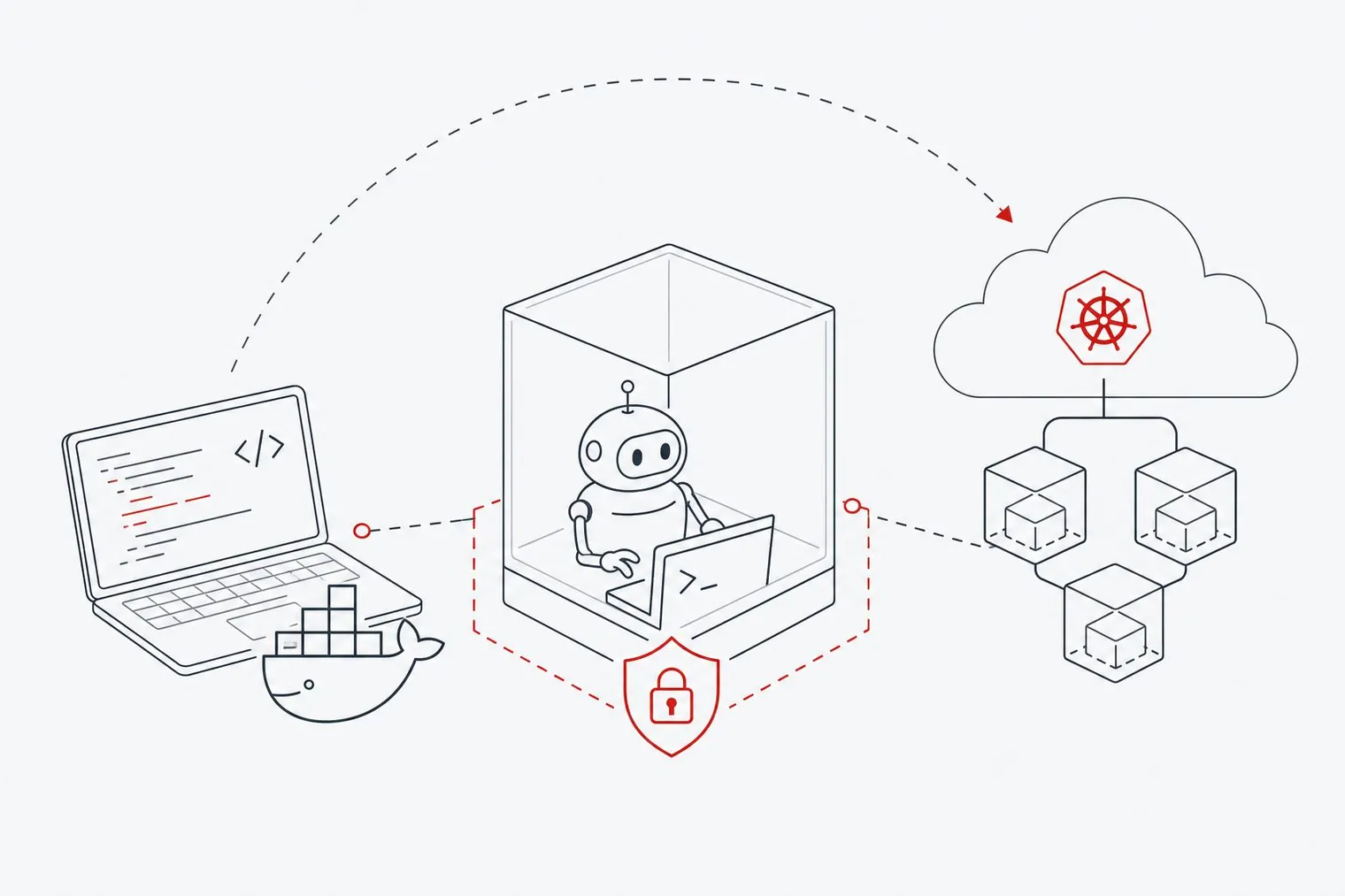
Two open-source GitHub projects cover most agent-sandbox setups. For local development, mattolson/agent-sandbox gives you the agentbox CLI, which runs coding agents inside Docker containers with a network policy. If you want many sandboxes on one machine with your API keys kept out of them, Hotcell runs them as containers or microVMs. For production, kubernetes-sigs/agent-sandbox adds a Sandbox resource to Kubernetes so you can run isolated agent workloads with runtimes like gVisor or Kata Containers.
This guide walks through each, starting with the local prerequisites and finishing on a Kubernetes cluster. Disclosure: Hotcell is ours. The local steps assume macOS or Linux; on Windows, run them inside WSL2.
What Does an Agent Sandbox Do?
An agent sandbox gives an AI agent an isolated place to run code, call tools and modify files without touching your host system or leaking credentials. Without one, a coding agent running autonomously can reach every secret in your shell environment and every file your user can read.
The stakes are real: Wallarm's Q1 2025 API threat report found that 65% of 2,869 security issues in agentic AI projects were API-related, and 60% were linked to access control. A sandbox limits the blast radius of both.
Step 1: Set Up Your Local Prerequisites
agentbox runs on Docker with Docker Compose. On macOS, Colima is a lightweight way to get a Docker engine without Docker Desktop:
- Install the tools:
brew install colima docker docker-compose docker-buildx. On Linux, install Docker Engine and the Compose plugin from your distribution's official instructions instead. - Start the VM:
colima start. - Check Docker works:
docker infoshould print your engine details without errors.
Step 2: Run a Coding Agent in a Local Sandbox with agentbox
agentbox runs a coding agent such as Claude Code, Codex, OpenCode or Gemini (preview) inside a container that can only read and write your repository directory, with outbound traffic filtered by a policy you control. The project is early-stage and warns of breaking changes between releases, so pin a version for team use.
- Install it:
curl -fsSL https://github.com/mattolson/agent-sandbox/releases/latest/download/install.sh | sh. It installs to~/.local/binby default. Check withagentbox version. - In your project directory, run
agentbox init. It asks which agent, mode and IDE you use, then writes Docker Compose and network-policy files under.agent-sandbox/. - Allow the hosts your agent needs, such as your model provider's API or a package registry, with
agentbox edit policy. Everything else stays blocked.agentbox policy configshows the resulting policy. - Open a shell in the sandbox with
agentbox execand start your agent inside it (for example, runclaude).agentbox upstarts the containers without attaching.
Your repository is mounted read-write so the agent can do its job; you can make .git read-only with AGENTBOX_MOUNT_GIT_READONLY. Secrets are injected through a proxy rather than handed to the container as plain environment variables. See the agentbox CLI docs for the full command list.
Alternative to Step 2: Run Agents in Hotcell Sandboxes
Hotcell (Apache-2.0) is a sandbox runtime that runs on the same Docker engine, or as Firecracker microVMs on Linux and Apple Virtualization microVMs on macOS. Where agentbox gives one sandboxed agent per project, Hotcell is built for running several at once, and it keeps your real API keys on the host: each sandbox gets a short-lived token that a gateway swaps for the key, with a spend cap you set.
Install it (Node.js 22 or later):
npm i -g hotcell. If you use Colima, point Hotcell at its socket first:export DOCKER_HOST=unix://$HOME/.colima/default/docker.sock.Add your model provider key on the host:
hotcell keys add openrouter. It never enters a sandbox.Create sandboxes for your repository, each on its own branch, with OpenCode preinstalled and wired to the gateway:
hotcell create -n 3 --name feat --branch auto --opencode \
    --repo https://github.com/you/app
Open a shell in one with
hotcell terminal <id>and runopencode. When you're done,hotcell rm --allremoves every sandbox and leaves your repository untouched.
Other agents can be installed in a sandbox the same way. On Linux, start the daemon with HOTCELL_EGRESS_ENFORCE=true to make outbound traffic default-deny at the firewall; with Docker on macOS that enforcement is advisory, so use the Apple Virtualization driver if you need it enforced. See the Hotcell page for what the gateway can and can't protect.
| agentbox | Hotcell | kubernetes-sigs/agent-sandbox | |
|---|---|---|---|
| Runs on | Your machine (Docker) | Your machine (Docker or microVMs) | A Kubernetes cluster |
| Best for | One agent per project | Several agents per machine | Production fleets |
| API keys | Injected by a proxy | Stay on the host; sandboxes get capped, revocable tokens | Kubernetes Secrets |
| Network | Policy you edit | Gateway plus optional default-deny egress | SandboxTemplate network policy |
Step 3: Deploy the Kubernetes Agent Sandbox Controller
For production, kubernetes-sigs/agent-sandbox, a Kubernetes SIG Apps project, manages isolated, stateful, singleton workloads through a Sandbox custom resource.
Install the controller and its extensions:
kubectl apply -f https://github.com/kubernetes-sigs/agent-sandbox/releases/latest/download/sandbox-with-extensions.yamlFor repeatable installs, pin a release instead of
latest.Check the controller is running:
kubectl get deploy agent-sandbox-controller -n agent-sandbox-systemCreate a sandbox. The runtime is chosen with the standard
runtimeClassName, and the RuntimeClass (for examplegvisor) must already exist on your cluster:apiVersion: agents.x-k8s.io/v1beta1 kind: Sandbox metadata: name: my-agent-sandbox spec: podTemplate: spec: runtimeClassName: gvisor containers: - name: agent image: your-agent-image:latest resources: limits: cpu: "1" memory: 512MiApply it with
kubectl apply -f my-sandbox.yaml.Add network rules and reuse with the extensions. Egress rules live on a
SandboxTemplate(underspec.networkPolicy), andSandboxClaimandSandboxWarmPoollet you request sandboxes from a template and keep warm ones ready. Current releases no longer create a per-sandbox Service unless you setspec.service: true; to reach sandboxes over HTTP, deploy the optional sandbox router from the repository. The API reference has the details.
GKE note: Google Cloud offers Agent Sandbox on GKE at no extra charge; standard GKE pricing for the underlying resources still applies. For Kata Containers, your node pool needs a machine type that supports nested virtualization.
Step 4: Drive Sandboxes From Code
To create and use sandboxes from your agent code rather than with kubectl, the project ships its own clients: a Python SDK (pip install k8s-agent-sandbox, see the Python client) and a Go SDK. The repository also has an experimental example that runs E2B's in-sandbox daemon inside a Sandbox pod, but there is no drop-in E2B-compatible API for creating sandboxes, so don't expect the E2B SDK to work against the controller unchanged.
In production, keep any credentials your agent needs in Kubernetes Secrets, and expose sandboxes through the router or your own Ingress rather than a port-forward.
What Is the Difference Between gVisor and Kata Containers in an Agent Sandbox?
Both harden container isolation, at different layers. gVisor intercepts system calls in a user-space kernel written in Go, so it runs on ordinary Linux nodes without hardware virtualization. The trade-off is overhead on syscall-heavy work such as file and network I/O.
Kata Containers run each workload inside a lightweight VM, so the agent never shares a kernel with the host. Isolation is stronger, but nodes need virtualization support and start-up is slower than with gVisor. In kubernetes-sigs/agent-sandbox you pick between them by setting runtimeClassName in the Sandbox's pod template. gVisor is a practical starting point for most coding agents; move to Kata when your threat model calls for full kernel isolation or you run untrusted, externally supplied code.
When a Self-Hosted Agent Sandbox Is the Better Choice
A managed cloud sandbox is convenient, but it means your code and credentials run on someone else's infrastructure. Self-hosting makes sense when your organization can't accept that, when agents need to reach internal APIs that aren't on the public internet, or when per-execution billing scales unpredictably with agent workload.
Self-hosted options vary in scope: some provide only the sandbox runtime, others bundle an agent. Hotcell, from Directionally Local, runs sandboxes on your own machines as Docker containers, Firecracker microVMs or Apple Virtualization microVMs, and keeps real API keys on the host by giving each sandbox a short-lived, spend-capped token. When you evaluate any option, check which isolation runtimes it supports and whether its API fits the agent and SDK you use.
FAQs
Which sandbox is best for AI agents?
It depends on where your workload runs and how strong the isolation needs to be. For local development, agentbox on Docker is a simple starting point for one agent, and Hotcell suits several agents per machine with keys kept on the host. For production workloads on Kubernetes, kubernetes-sigs/agent-sandbox with gVisor or Kata Containers is the more complete option. If code and credentials must stay on your own hardware outside Kubernetes, look at a self-hosted runtime.
What is GitHub sandbox?
"GitHub sandbox" isn't an official GitHub product. In the context of AI agents it usually means open-source sandbox projects hosted on GitHub, such as agentbox and kubernetes-sigs/agent-sandbox.
How do I troubleshoot a sandbox I can't reach?
First confirm the controller is healthy with kubectl get deploy agent-sandbox-controller -n agent-sandbox-system and that your Sandbox pod is running. Remember that current releases don't create a Service per sandbox by default: set spec.service: true or deploy the sandbox router, and check that any network policy on your SandboxTemplate allows the traffic you expect.
Does Agent Sandbox on GKE cost extra?
No. Google offers it at no extra charge; you pay standard GKE pricing for the nodes, storage and networking it uses. Kata Containers need node types with nested virtualization, which affects which machines you can choose.
Can I use Claude Code, Codex or Gemini in a self-hosted agent sandbox?
Yes. agentbox supports Claude Code, Codex, OpenCode and others, with Gemini in preview: you run the agent inside the container with agentbox exec, so its file and network access is limited to what the sandbox allows. The agent's model API calls still go to its provider unless you point it at a self-hosted model.
Conclusion
Setting up an agent sandbox from GitHub is a two-stage process. Start locally, with agentbox for a single agent or Hotcell for several, where you can iterate quickly without a cluster. When you need production isolation, install kubernetes-sigs/agent-sandbox and choose gVisor or Kata Containers through runtimeClassName.
The concrete next step: run agentbox init in a project, then review the policy with agentbox policy config before you start an agent. Knowing exactly what your agent can reach is the highest-value security check you can make before letting it loose on real code.