Hotcell · agent sandboxes · v0.1.26
Hotcell: sandboxes for AI agents, on your own hardware.
Run as many isolated agent sandboxes as a machine can hold, as Docker containers, Firecracker microVMs or Apple Virtualization microVMs. Your real API keys never enter any of them. Open source under Apache-2.0.
npm i -g hotcellpip install hotcellRuns on, and runs
 Docker
 Apple Virtualization
 Firecracker on Linux
 OpenCode
 Claude Code
 Codex
Codex OpenRouter
 Anthropic
 OpenAI
What Hotcell is
Hotcell is a sandbox runtime for AI agents that runs on your own machines. One daemon manages as many isolated sandboxes as the hardware can hold, shows live CPU, memory and model cost for each, and refuses new ones when the machine is full. It's the sandbox layer of the Directionally Local stack, and it works with any agent. The full documentation lives in the guide on GitHub.
The commands that matter
hotcell keys add openrouter                    # the key stays on the host
hotcell create -n 5 --name feat --branch auto --egress \
    --repo https://github.com/you/app          # five sandboxes, one branch each
hotcell terminal <id>                          # a shell inside a sandbox
hotcell rm --all                               # everything gone, your repo untouched
Keys stay on the host
With --egress, each sandbox gets a per-sandbox token instead of your API key. Its model calls go through Hotcell's gateway, which swaps the token for the real key, forwards the call and records the cost. A leaked token is worth little: it can be capped, limited to certain models, rate-limited, set to expire and revoked without touching the real key. GitHub works the same way, so git push from a sandbox works without a GitHub token inside it.
Containers or microVMs
| Driver | Platform | Isolation |
|---|---|---|
| Docker containers | macOS and Linux | Shared kernel; fastest to start |
| Firecracker microVMs | Linux with KVM | Own kernel per sandbox |
| Apple Virtualization microVMs | macOS | Own kernel; no network device by default |
On Linux, HOTCELL_EGRESS_ENFORCE=true makes outbound traffic default-deny at the host firewall: sandboxes reach only the gateway and an allowlist of package registries and git hosts. On macOS, Apple Virtualization microVMs have no network device unless you add one. With Docker Desktop on macOS, egress rules are advisory.
An audit log for every sandbox
Hotcell records what happens inside each sandbox as structured events: sandboxes created and destroyed, commands started and finished, files read and written, terminals opened, ports exposed, backups, outbound connections allowed or blocked by the firewall, model calls through the gateway, spend limits reached and rejected logins. Events go to ~/.hotcell/audit.jsonl, and to any OpenTelemetry collector when you set HOTCELL_OTLP_ENDPOINT, so security tools such as Agent Beacon or your SIEM see every sandbox as its own session. Command text is scrubbed of common credential patterns, and keys, file contents and raw tokens are never included. Export never slows the sandboxes down: if the collector is unreachable, events are retried briefly and then dropped from the export, while the local log keeps them.
Hotcell and Autopilot
Autopilot, our coding agent, uses Hotcell for its subagents: each one investigates your code read-only in its own sandbox, with a token instead of your OpenRouter key. For how it compares with other self-hosted options, read open-source alternatives to cloud AI coding sandboxes.
FAQs
Is Hotcell free?
Yes. Hotcell is open source under Apache-2.0 and runs on hardware you already have: a Mac, a Linux box or a cloud VM.
How does Hotcell keep API keys out of the sandbox?
You add your keys to Hotcell on the host. Each sandbox gets a base URL pointing at Hotcell's gateway and a short-lived token instead of the key. The gateway swaps the token for the real key on the way out. Tokens can be capped by spend, model, rate and expiry, and revoked one at a time.
What can't the gateway protect?
Credentials that aren't sent in an HTTP header: database passwords for Postgres, Redis or MongoDB, request-signing keys like AWS SigV4, mTLS client certificates and OAuth refresh-token exchanges. If a sandbox needs one of those, the real value has to go in.
Which operating systems does Hotcell support?
macOS and Linux. Docker containers work on both, Firecracker microVMs need Linux with KVM, and Apple Virtualization microVMs need macOS. Hotcell needs Node.js 22 or later; there's also a Python SDK.
Does Hotcell work with any coding agent?
Yes. Any agent can be installed in a sandbox and pointed at the gateway. hotcell create --opencode sets up OpenCode automatically, and Autopilot uses Hotcell for its subagents.
Can I send Hotcell's activity to my SIEM?
Yes. Hotcell writes an audit log of what happens in each sandbox: commands, file access, terminals, exposed ports, backups, outbound connections allowed or blocked, gateway calls and spend limits, and rejected logins. It goes to ~/.hotcell/audit.jsonl by default, and to any OpenTelemetry collector, such as Agent Beacon or your SIEM, when HOTCELL_OTLP_ENDPOINT is set. Secrets, file contents and raw gateway tokens are never recorded.
How is this different from running an agent in plain Docker?
Plain Docker shares the host kernel, exposes any key you pass with -e, and leaves the network open. Hotcell adds microVM options, keeps keys on the host behind per-sandbox tokens, caps spend, can make egress default-deny, and refuses new sandboxes when the machine is full instead of running out of memory.
Related reading
-
How to Stop a Coding Agent From Leaking API Keys Through Subagents
Why subagents multiply the risk of leaked API keys, the five controls that stop it, and how to set them up on your own machine with Hotcell.
-
Directionally Local vs OpenHands: Self-Hosted Coding Agents
OpenHands and Directionally Local both run coding agents you can self-host. How they differ on sandboxing, API keys, spend limits and models.
-
Open-Source Alternatives to Cloud AI Coding Sandboxes (2026)
Hotcell, E2B's open-source runtime, microsandbox, agent-sandbox for Kubernetes and more: self-hostable sandboxes for AI coding agents, compared.
-
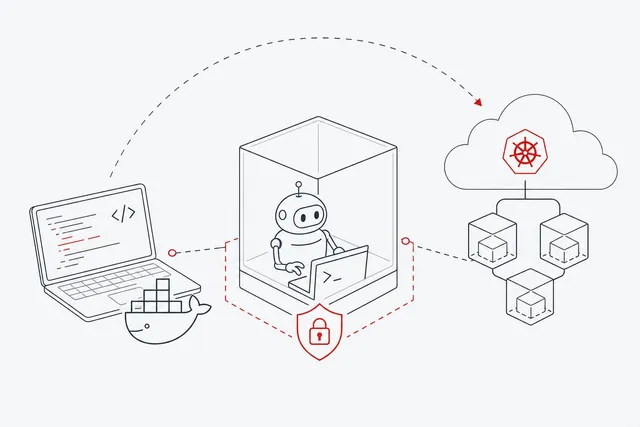
Agent-Sandbox GitHub: How to Set One Up From Scratch
Set up an agent sandbox from GitHub projects: agentbox or Hotcell on your own machine, and kubernetes-sigs/agent-sandbox for production Kubernetes clusters.