Blog / Claude Code
Agentic Coding with Claude Code: a Starter Guide for Devs
A starter guide to agentic coding with Claude Code: installation, CLAUDE.md, Plan Mode, subagents, MCP and sandboxing, with a review-first workflow.
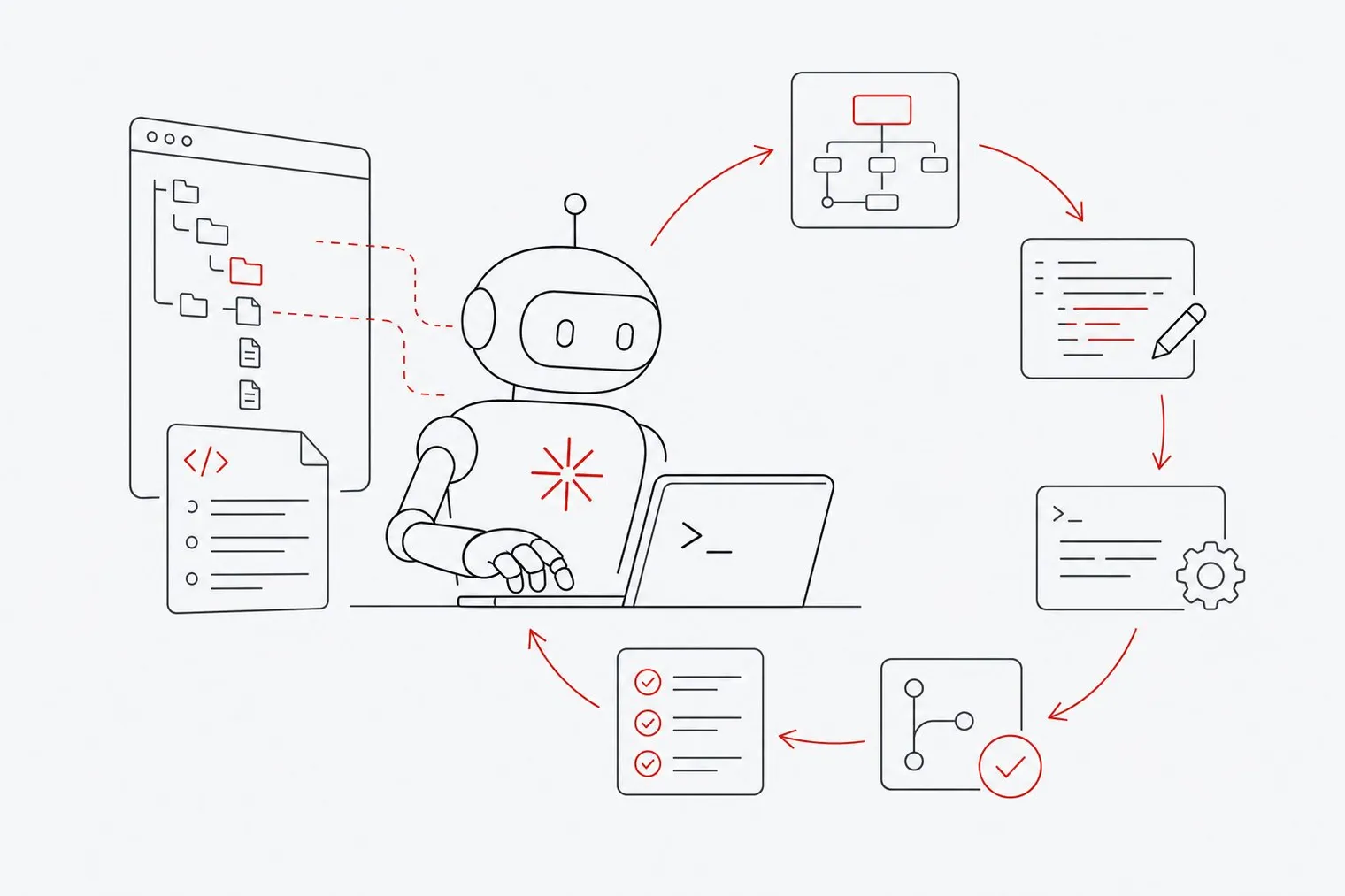
Agentic coding with Claude Code means giving a terminal-based agent a goal and letting it read your project files, plan multi-file edits, run shell commands, and commit the result in one continuous loop. This guide covers installation, the CLAUDE.md context file, Plan Mode, subagents, and a self-hosted sandbox option for teams who need to keep real API keys away from agent subprocesses.
What Is Agentic Coding with Claude Code?
Regular AI code generation is a single exchange: you send a prompt, the model returns code, and you paste it into your editor. Agentic coding is different. The agent holds a goal across multiple steps, reads your actual files, makes decisions about what to change, runs commands to verify its work, and loops until the task is done.
Claude Code is a terminal-based agent that reads project files, edits code, executes shell commands, manages Git operations, and coordinates specialized subagents for research and planning. You run it from your terminal, point it at a codebase, and give it a task in plain language.
The adoption numbers show this workflow has moved well past early adopter territory. According to gradually.ai's roundup of a 2026 JetBrains survey of over 15,000 professional developers, 39% reported using Claude Code for their work. Anthropic said in February 2026 that Claude Code's run-rate revenue had grown to over $2.5 billion.
That scale matters because it means the tooling, documentation, and community knowledge around Claude Code have matured quickly. Still, results vary sharply by how you use it. Anthropic's analysis of Claude Code sessions found that sessions rated novice reached verified success 15% of the time, versus 28–33% for sessions rated intermediate or above. The gap is real, and this guide is built around closing it.
System Requirements and Cost: What You Need Before You Install
You need a supported macOS, Linux or Windows machine, an internet connection, terminal access and a project directory to work in. The recommended native installer doesn't need Node.js; if you install through npm instead, check Anthropic's setup page for the current Node.js version and supported operating systems.
On the access side, Claude Code needs a paid Claude plan (Pro, Max, Team or Enterprise) or a Claude Console account billed per token; it can also run through cloud providers such as Amazon Bedrock and Google Cloud. The free Claude plan does not include Claude Code. A subscription suits developers who run Claude Code regularly and want predictable costs. Console billing suits teams or individuals who run heavier, less frequent sessions and want to pay for exactly what they use.
Claude Code itself carries no separate license fee, but every prompt and completion draws from whichever access option you choose. Anthropic reports that Claude Code users average about 20 hours per week of agent runtime (time Claude Code is actively running, not hands-on time), which is a useful benchmark when estimating whether a fixed plan or pay-per-token billing will cost less for you.
How to Install Claude Code on macOS, Linux, and Windows
Installation follows the same core steps across platforms, with small differences in how you get the binary.
Install with the native installer. On macOS, Linux or WSL, run curl -fsSL https://claude.ai/install.sh | bash. On Windows PowerShell, run irm https://claude.ai/install.ps1 | iex. Alternatives include Homebrew (brew install --cask claude-code) and npm (npm install -g @anthropic-ai/claude-code). Check it worked with claude --version.
Navigate to a project directory in the terminal and launch the interactive session. Change into the root of the project you want to work on, then run claude to start the session. Claude Code reads the files in that directory to build its initial context.
Complete the initial one-time authentication via the web browser. On first launch, Claude Code opens a browser window and asks you to sign in with your Anthropic account. This links the CLI to your Claude subscription or Console account. After you authenticate, the terminal session resumes and you will not need to repeat this step on the same machine.
Once authentication completes, you have a running agent session. The next step before giving it any real task is setting up a CLAUDE.md file, which tells the agent how your project is structured and what conventions it should follow.
How Do You Set Up the CLAUDE.md File for Agentic Coding with Claude Code?
A CLAUDE.md file is a plain Markdown file, usually at your repository root, that Claude Code reads at the start of every session to understand your project's structure, conventions, and constraints. The agent treats its contents as standing instructions that apply to every task you give it. Run /init inside a session to generate a starter file from your codebase, then edit it.
Without this file, the agent has to infer your conventions from the code itself. It may pick the wrong test runner, use a style that conflicts with your linter, or make assumptions about your deployment setup that break things downstream. A well-populated CLAUDE.md reduces that guesswork.
What belongs in the file depends on your project, but a useful starting point covers five areas: the tech stack and language versions you are using, the commands to run tests and linting, any architectural rules the agent should not break (such as "never write directly to the database outside the repository layer"), the folder structure and what each major directory contains, and any environment variables or secrets the agent should reference by name but never print or log.
Keep each entry short and specific. A line like "use pytest for all tests, never unittest" is more useful than a paragraph explaining why. The agent reads this file on every session start, so dense prose dilutes the signal; keep it to a couple of hundred lines at most.
You can have more than one. CLAUDE.md files in your working directory and the directories above it are all loaded and combined at launch, a personal one in ~/.claude/CLAUDE.md applies to every project, and a CLAUDE.md in a subdirectory is loaded when Claude starts working with files there. That lets monorepos carry per-package rules without bloating the root file. See Anthropic's memory docs for the details.
Running the Plan-Edit-Run-Review Workflow Step by Step
The Plan-Edit-Run-Review loop is the core of expert-level agentic coding. Each phase has a clear purpose, and skipping any one of them is where most sessions go wrong.
Activate Plan Mode before starting any complex task. Press Shift+Tab to cycle through permission modes until the status line shows plan mode, or start a session with claude --permission-mode plan. In this mode, Claude Code researches and proposes a sequence of changes for you to read and approve. You see what the agent intends to do across every file before a single line is written.
Review the plan carefully. Read each proposed step. Check that the agent has identified the right files, that the order of operations makes sense, and that no step will break a dependency or contradict a rule in your CLAUDE.md. If something looks wrong, tell the agent in plain language what to change. You can iterate on the plan without any code being modified.
Approve the plan to let the agent perform multi-file edits and terminal commands. Once you confirm, Claude Code moves into execution. It applies edits across files, runs shell commands, and handles Git staging as needed. This is the step where the agent does the bulk of its work, so your earlier review is what keeps it on track.
Execute verification commands to ensure the agent's work meets quality standards. After edits are complete, run your test suite, linter, and any build commands. You can ask Claude Code to run these for you, or run them yourself in a separate terminal. Either way, do not skip this step. A passing test suite is the clearest signal that the agent's changes are correct.
Review the code diffs and commit the finalized changes to Git. Use git diff or your preferred diff tool to read every change the agent made. Look for anything that was not in the original plan. When you are satisfied, commit with a message that describes the task. Claude Code can draft the commit message, but you should read it before accepting.
Following this sequence consistently is what separates reliable results from unpredictable ones; structured review at each phase is a big part of what the more successful sessions in Anthropic's data have in common.
Plan Mode is not the only way to run Claude Code. Its permission modes range from asking before every edit, to accepting file edits automatically, to more autonomous modes for well-scoped work; Shift+Tab cycles between them. The right choice depends on how well-defined the task is and how much of your codebase it touches. Anthropic's permission-modes docs list them all.
What Are Claude Code's Specialized Subagents and MCP Servers?
Claude Code can delegate work to subagents: separate agents that each run in their own context window and return a summary to the main session. It ships with built-in ones (for example, a read-only explorer for searching a codebase), and you can define your own as Markdown files with YAML frontmatter in .claude/agents/ (per project) or ~/.claude/agents/ (for all projects). See the subagents docs.
The practical benefit is that a large task does not have to saturate a single context window. The subagents handle targeted work and pass their findings back, keeping the main agent's context focused on the current decision.
Claude Code connects to external tools and services through the Model Context Protocol (MCP). Add a server with claude mcp add, or share servers with your team in a project .mcp.json file. This lets the agent interact with things beyond your local file system and shell. The categories of integrations available include version control platforms, issue trackers, documentation sources, databases, and communication tools, among others.
If your team uses Jira, for example, adding the Jira MCP server lets the agent read ticket descriptions and update status without you copying context manually. If your codebase depends on external API documentation, an MCP server that can fetch and search that documentation keeps the agent accurate on library-specific details.
MCP servers are published by vendors and the open-source community; Anthropic's MCP docs explain how to add and scope them. The servers worth adding depend on your stack and where the agent currently has to ask you for information it could retrieve itself.
When a Self-Hosted Sandbox Is the Safer Choice for Your Team
Running agentic coding on a shared team machine introduces a specific risk: subagents that execute shell commands can read environment variables, which often include real API keys, database credentials, and service tokens. If an agent subprocess reads and logs those values, or if a prompt injection in a file causes it to exfiltrate them, you have a breach that is hard to detect and harder to audit.
This risk grows as you move from solo development to team workflows. One developer running Claude Code on their own laptop controls what is in their environment. A team sharing a CI server or a shared dev box does not have that control, and the blast radius of a compromised session is larger.
A third-party analysis of 23.09 million public GitHub pull requests opened in September 2026 found that at least 25.8% carried coding-agent signatures, a lower bound that covers public repositories only. Agent-written code is now common, so the security posture around those agents matters.
Claude Code has a built-in starting point: its sandbox (turn it on with /sandbox) uses OS-level isolation to limit which files and network hosts its shell commands can reach. It covers shell commands, not every tool, so it's worth knowing its boundaries.
For teams that want to go further and keep real credentials out of the agent's environment entirely, Hotcell from Directionally Local runs agent sandboxes on your own hardware as Docker containers, Firecracker microVMs or Apple Virtualization microVMs. A key-swapping gateway gives each sandbox a short-lived, spend-capped, revocable token while the real API keys stay on the host, and outbound network access is denied by default. Its companion agent, Autopilot, uses Hotcell for its read-only subagents. Both are free and open source; Directionally Local for Teams adds a commercial deployment for companies.
If your team has compliance requirements, handles credentials in shared environments, or runs agents on infrastructure you do not fully control, treat sandboxing as part of the setup, not an afterthought.
FAQs
Is AI coding hard to learn for developers who are new to agentic tools?
The learning curve is real. The gap between novice and expert users comes from context quality and workflow discipline, not raw programming skill. Setting up a thorough CLAUDE.md file, using Plan Mode on complex tasks, and reviewing diffs before committing are the three habits that move results toward the expert range fastest.
Can Claude Code run autonomously without human approval on every step?
Yes. Claude Code has permission modes that let it proceed through edits and commands without pausing for approval on each step. This suits smaller, well-scoped tasks where you trust the agent's judgment on the scope. For larger tasks that touch many files or run destructive commands, Plan Mode gives you a review checkpoint before any changes are written. The right choice depends on task complexity and how much of your codebase is in scope.
Does Claude Code work with models other than Anthropic's own Claude models?
Claude Code is built for Claude models, which you can reach through Anthropic directly or through cloud providers such as Amazon Bedrock and Google Cloud. If you want any OpenRouter model or your own self-hosted endpoint, you need a different agent; Autopilot, for example, works with any OpenRouter model or OpenAI-compatible endpoint.
How does Plan Mode differ from the other permission modes?
In Plan Mode, Claude Code can read and research but proposes changes for your review before writing anything to disk. No files are modified until you approve the plan. In the other modes, the agent applies edits and runs commands as it works, either asking you first or, in the more autonomous modes, proceeding on its own within the limits you've set.
What is the difference between a subagent and a standard Claude Code prompt?
A subagent runs in its own context window with its own instructions and tool access, then hands a summary back to the main session. That keeps the main conversation focused while a side task, such as searching a large codebase, happens elsewhere.
Conclusion
Agentic coding with Claude Code is a structured workflow, not a one-shot prompt. The Plan-Edit-Run-Review loop, a well-populated CLAUDE.md file, and deliberate use of Plan Mode are what separate reliable results from unpredictable ones. Anthropic's data shows expert-rated sessions succeed more than twice as often as novice-rated ones, and that gap closes with practice and process, not luck.
Start by installing Claude Code and writing a CLAUDE.md file for one real project you are already working on. Run your first task in Plan Mode, review the proposed changes before approving, and check the diffs before committing. Once that loop feels natural, explore subagents and MCP servers for tasks that need external context. If your team runs agents on shared infrastructure, look into a sandbox layer that isolates credentials before you scale.