Blog / coding agents
Autopilot vs Claude Code, Codex, OpenCode, Cursor and Pi
How Autopilot compares with Claude Code, Codex, OpenCode, Cursor and Pi on model choice, cost visibility, sandboxing and self-hosting.
Choosing a terminal coding agent
The terminal coding agent space has gotten crowded fast. Claude Code, OpenCode, OpenAI Codex, Cursor, Pi — each makes a compelling case. But once you start digging into the tradeoffs, a specific set of requirements tends to separate the tools: model flexibility, real cost visibility, and whether the agent can run untrusted subagent work without your API keys ever leaving your machine.
That's the space the Autopilot coding agent is built for. This comparison is for developers weighing Autopilot against Claude Code, OpenCode, Codex, Cursor and Pi when infrastructure control is a priority.
This article walks through each tool honestly — including where Autopilot is still an earlier-stage project, and where its architecture offers something the bigger names don't.
The Tools at a Glance
| Tool | Open Source | Sandbox / Isolation | Model Flexibility | Pricing |
|---|---|---|---|---|
| Autopilot | Yes (MIT) | Subagents in separate microVMs or containers via Hotcell; real API key never enters the sandbox | 25+ providers with your own key: OpenRouter's 400+ models, Anthropic, OpenAI, Gemini, local Ollama and more | Free (bring your own key) |
| OpenCode | Yes (MIT) | No built-in isolation layer | 75+ providers | Free (bring your own key) |
| Claude Code | No | OS-level sandbox for its Bash commands | Claude models | Claude subscription or API key |
| Codex CLI (OpenAI) | Yes | OS-level sandbox for its commands, on by default | OpenAI models by default | ChatGPT plan or API key |
| Cursor | No | Varies by mode | Models offered in Cursor | Subscription |
| Pi | Yes | No built-in isolation layer | Bring your own model | Free (bring your own key) |
Autopilot: What It Actually Is
Autopilot (npm package autopilot-ai, GitHub: sinameraji/autopilot, MIT license) is a terminal-based coding agent you install globally with npm install -g autopilot-ai. It runs on Node 20+ across Windows, macOS, and Linux.
The core idea: bring your own key. OpenRouter is the default, with 400+ models (Claude, GPT, Gemini, Grok, Qwen, GLM, Kimi, DeepSeek and free-tier models), and Anthropic, OpenAI, Gemini, DeepSeek, local Ollama and about 20 more providers work directly. Switch models mid-session with /model, and providers with /provider. Autopilot adds no proxy or markup of its own.
If you'd rather keep model traffic off third-party services entirely, point Autopilot at your own OpenAI-compatible endpoint instead — for example an open-weight model served on your own hardware. That is what makes the fully self-hosted setup possible.
Real Cost Visibility
The status bar shows your actual per-turn billed cost in real time. The /cost command gives you session, daily, monthly, and all-time totals — not estimates, but what your provider actually billed. For developers managing cloud spend across multiple projects, that distinction matters more than it sounds.
Three Operating Modes
Autopilot ships with three modes that give you explicit control over agent autonomy:
- Plan mode — read-only, whitelisted tools only. Good for reviewing what the agent intends to do before it touches anything.
- Edit mode — prompts before each mutating call. The default, and the right choice for most active development sessions.
- Auto mode — full autonomy for trusted, well-scoped tasks. Useful for unattended jobs where you've already validated the agent's approach.
Context and Image Understanding
Depending on the model you select, Autopilot supports context windows up to 1M+ tokens. It also handles image inputs — PNG, JPG, WebP, GIF, BMP up to 5MB — which makes it practical for UI review, architecture diagrams, or passing screenshots of error states directly to the agent.
The Hotcell Sandbox Layer
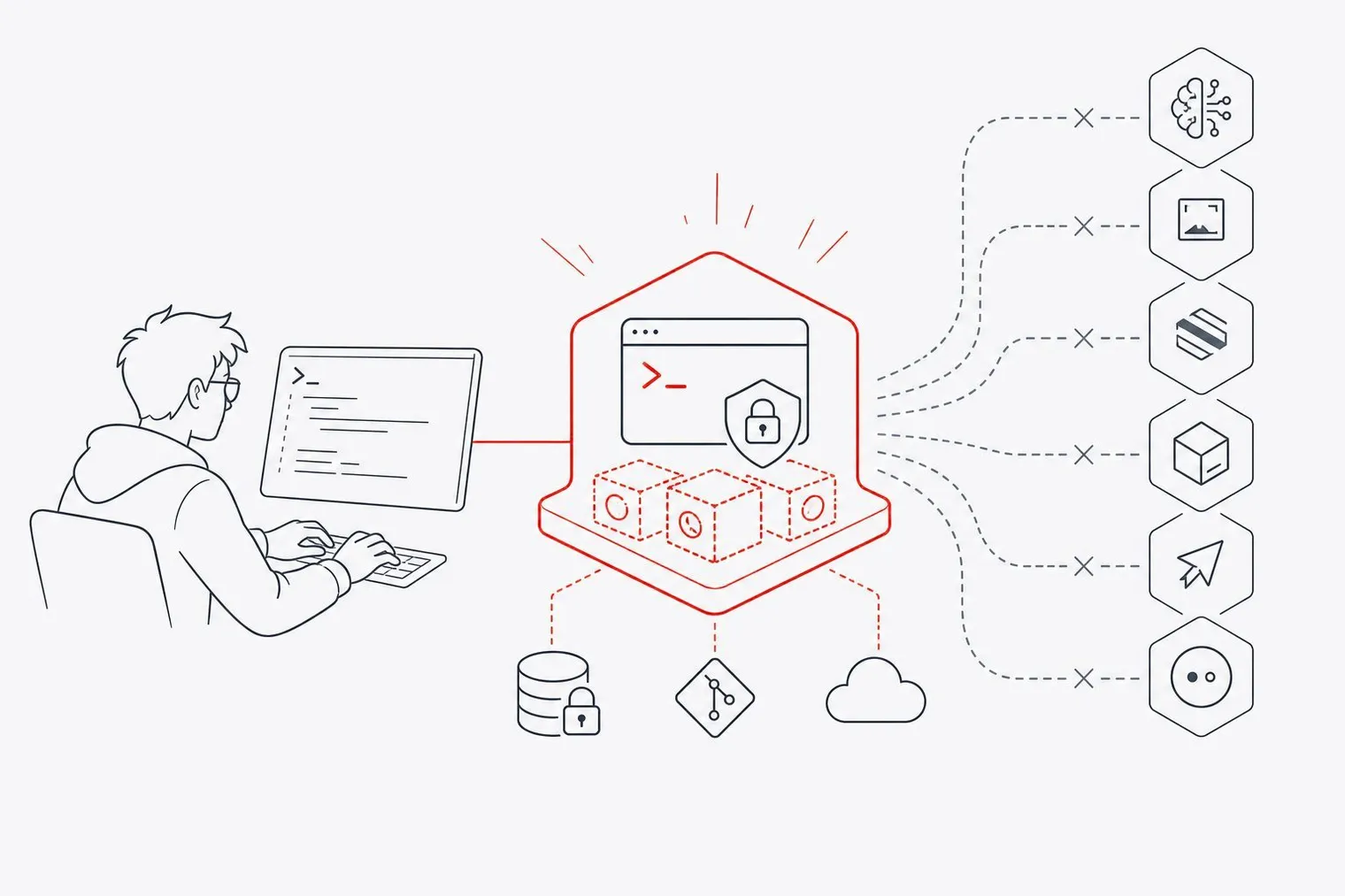
This is the architectural differentiator. When Autopilot delegates work to subagents, those subagents run inside isolated environments provided by Hotcell — Firecracker microVMs, Apple Virtualization Framework VMs, or Docker containers, depending on your platform. Subagents are read-only: they can investigate and report back, but they can't edit files, run a shell or open PRs.
The subagent can see your working tree, including uncommitted changes, but your real API key never enters the sandbox. Hotcell swaps in short-lived tokens for the duration of the subagent's work. When the job finishes, the token expires. If a subagent does something unexpected, the blast radius is contained.
Claude Code and Codex both sandbox the commands their agent runs on your machine, and that's a real safeguard. Hotcell goes a step further for subagents: each one gets its own microVM or container, and your real API key stays outside it.
Programmable and Headless
Autopilot exposes a headless SDK with JSONL-over-stdio RPC, so you can drive it programmatically from scripts, CI pipelines, or orchestration layers. Long-running unattended jobs support budget caps and checkpoint controls to prevent cost overruns while you're not watching.
It also supports LSP, MCP, local SQLite with embeddings for persistent memory (remember, recall, forget), and loop guardrails to prevent runaway agent cycles.
OpenCode: The Closest Open-Source Peer
OpenCode is the most philosophically similar tool to Autopilot on this list. It's MIT-licensed, model-agnostic across 75+ providers, and runs in terminal, desktop, and IDE contexts. Its community is far larger than Autopilot's.
That gap is real and worth naming honestly. OpenCode has more contributors, more community-tested surface area, and more integrations at this point in time.
Where Autopilot differs is the sandbox layer. OpenCode has no built-in microVM or container isolation equivalent to Hotcell. If you want to run subagents safely, that setup is on you. For teams where isolation is a hard requirement — regulated environments, shared infrastructure, multi-agent pipelines — Autopilot's built-in approach removes a significant amount of setup and risk.
Claude Code: Best-in-Class for Claude, Closed Everything Else
Anthropic's Claude Code CLI is genuinely excellent if you're committed to the Claude model family. The tool-calling quality, context handling, and integration depth are among the best available for single-model agent work.
It also takes safety seriously: Claude Code can run its Bash commands inside an OS-level sandbox that limits which files and network hosts they can reach.
The constraints are structural. Claude Code is closed source and built around Anthropic's models, whether you pay through a Claude subscription or an API key. You can't point it at any model you like or at your own self-hosted model. If Anthropic changes pricing, deprecates a model, or has an outage, your workflow has no easy fallback.
For developers who want to stay in the Claude ecosystem and don't need model flexibility or local sandboxing, it's a strong choice. For everyone else, the lock-in is a real cost.
OpenAI Codex: Convenient If You're Already in the OpenAI Ecosystem
Codex CLI is OpenAI's open-source terminal coding agent, usable with a ChatGPT plan or an API key. It sandboxes the commands it runs by default, with network access off and writes limited to your workspace, which is a sensible default.
It's built around OpenAI's models. If they suit your workload and vendor dependency isn't a concern, Codex is a reasonable default. If you want to route freely across hundreds of models, track billed cost per turn, or run subagents in separate microVMs with no real keys inside, Autopilot covers ground Codex doesn't.
Cursor: The IDE Agent, Not the Terminal Agent
Cursor is an AI-native IDE built on VS Code. It's excellent at what it does — multi-file editing, in-editor agent UX, and a polished GUI experience for developers who prefer a visual environment.
It's also a different category of tool. Cursor is IDE-first; it has added a CLI agent that can run headless, but the product is built around the editor. It's closed source and subscription-based.
If you want an IDE with strong AI integration, Cursor is worth evaluating. If you want an open-source terminal agent you can script, point at your own models, and run with isolated subagents, Autopilot is the closer fit.
Pi: Minimal by Design
Pi, built by Mario Zechner, takes the opposite approach to complexity. Its core is intentionally small — minimal, extremely hackable, bring-your-own-model. It's the right tool if you want something you can fully read and understand in an afternoon and are comfortable building your own scaffolding around it.
Much of what Autopilot ships built in — subagent sandboxing, structured memory, billed cost tracking — Pi deliberately leaves to extensions or to you. That's not a criticism; it's the point. Pi optimizes for simplicity and auditability over features.
If you're building a custom agent harness from scratch and want a minimal foundation, Pi is worth a look. If you need production-grade isolation and multi-agent orchestration without building it yourself, Autopilot is the better starting point.
The Core Differentiation
No single tool in this list combines all three of the following:
- A terminal-native, multi-model coding agent with cost tracking per turn and 25+ providers via your own key, including a self-hosted endpoint
- A built-in local microVM/container layer that keeps your real API keys out of subagent sandboxes, with spend caps
- Fully open source (MIT), with no platform fee
OpenCode is the nearest open rival but lacks the Hotcell layer. Claude Code and Codex sandbox their own commands but are built around a single provider's models, and Claude Code is closed source. Cursor is IDE-first. Pi is open but intentionally minimal.
Autopilot is a smaller, earlier-stage project than most of these — the community is smaller and the integrations are fewer. Its bet is the architecture: model freedom plus the Hotcell isolation layer for subagents.
Getting Started
Install Autopilot globally:
npm install -g autopilot-ai
Or run it without installing:
npx autopilot-ai
Bring a key for any of 25+ providers (OpenRouter by default), or run a local model through Ollama or LM Studio. If you need sandboxed subagents or API-key isolation for multi-agent pipelines, pair it with Hotcell. Full details at directionallylocal.com.
FAQs
What makes Autopilot different from Claude Code or Codex? Autopilot is open source, works with 25+ providers, from OpenRouter to local Ollama, and runs subagents in Hotcell sandboxes that never see your real API keys. Claude Code and Codex sandbox the commands they run, but both are built around a single provider's models, and Claude Code is closed source.
Does Autopilot work with Claude models?
Yes. Autopilot supports Anthropic directly, through its native Messages API, and through OpenRouter, so you can use Claude models alongside GPT, Gemini, DeepSeek, Grok and others, switching with /model or /provider at any point in a session.
What is Hotcell and do I need it? Hotcell is the sandbox layer that runs Autopilot subagents inside isolated Firecracker microVMs, Apple Virtualization Framework VMs, or Docker containers. Subagents are read-only, and your real API key stays on the host. You don't need it for basic agent use, but if you're running multi-agent pipelines or working in environments where API-key isolation matters, it's the key differentiator.
How does Autopilot handle cost tracking?
The status bar shows your actual per-turn billed cost in real time. The /cost command gives you session, daily, monthly, and all-time totals based on what your provider actually billed — not an estimate.
Is Autopilot suitable for CI pipelines or unattended jobs?
Yes. The headless SDK with JSONL-over-stdio RPC lets you drive Autopilot programmatically. On a server, autopilot serve runs detached tasks with runtime, token and cost budgets, resumes them from checkpoints after a restart, and emails you when a run finishes, fails or needs input. You can answer a needs-input email by replying.
How does Autopilot compare to OpenCode? Both are MIT-licensed, model-agnostic terminal agents. OpenCode has a significantly larger community and more integrations. Autopilot's advantage is the built-in Hotcell sandbox layer — OpenCode leaves API-key isolation and subagent sandboxing to the user.
What are the system requirements?
Node 20 or higher. Works on Windows, macOS, and Linux. Install via npm install -g autopilot-ai or run with npx autopilot-ai.